The user console is the defining layer of any cloud. A modern OpenStack environment is not shaped by its backend alone — it is shaped by how users see it, operate it, and reason about it. While OpenStack provides a powerful CLI and a rich API surface, real‑world operations demand visualization, composition, and context that no sequence of commands can fully express.
Every meaningful cloud action — from diagnosing network issues to understanding resource topology — requires a console capable of assembling dozens or even hundreds of API calls into a coherent, human‑friendly view. Operators rely on diagrams, graphs, and aggregated insights to understand system health. Tenants expect intuitive workflows, not a maze of forms and plugins. As infrastructures grow more distributed and multi‑cluster, the console becomes the operational cockpit of the cloud.
Yet the OpenStack console ecosystem remains fragmented. Horizon is stable but aging. Skyline is modern but incomplete. Vendor dashboards are polished but closed. Billing‑oriented tools solve narrow problems but lack full coverage. No single upstream solution delivers the unified, enterprise‑grade experience operators now expect.
This blog provides a clear, practical comparison of today’s OpenStack console landscape — Horizon, Skyline, vendor‑specific dashboards, niche tools — and explains how Uniview delivers a modern, unified alternative designed for multi‑cluster, multi‑region, and enterprise‑scale operations.
The Current OpenStack Console Landscape
User consoles in OpenStack are inherently complex because they sit at the intersection of infrastructure and business logic. Unlike backend services with well‑defined technical boundaries, consoles must adapt to wildly different expectations around workflows, visualization, governance, and integration. Horizon was built to support technology‑centric operations, not the diverse and evolving needs of business‑facing teams—and that distinction matters.
Expecting the open‑source community to deliver a universal, enterprise‑grade console simply isn’t realistic. The amount of UI logic, workflow orchestration, and domain‑specific variation required to satisfy real‑world organizations makes a “one‑size‑fits‑all” solution technically and organizationally unsustainable for upstream. This is why today’s landscape remains fragmented: from time time, from project to project, initiatives are not rare for building or customizing to bridge the gap between infrastructure capabilities and business requirements.
This is why Horizon and Skyline focus on technology‑centric processes rather than business‑centric experiences. They provide essential upstream coverage, but they are not meant to serve as fully tailored operational consoles. The gap between “upstream‑correct” and “enterprise‑ready” is what we refer to as last‑mile engineering—the work required to refine, integrate, and elevate the console into something that meets real‑world operational complexity.
With that context in mind—understanding both the strengths and the natural constraints of the community—we can now examine the major categories of existing OpenStack consoles and how they differ.
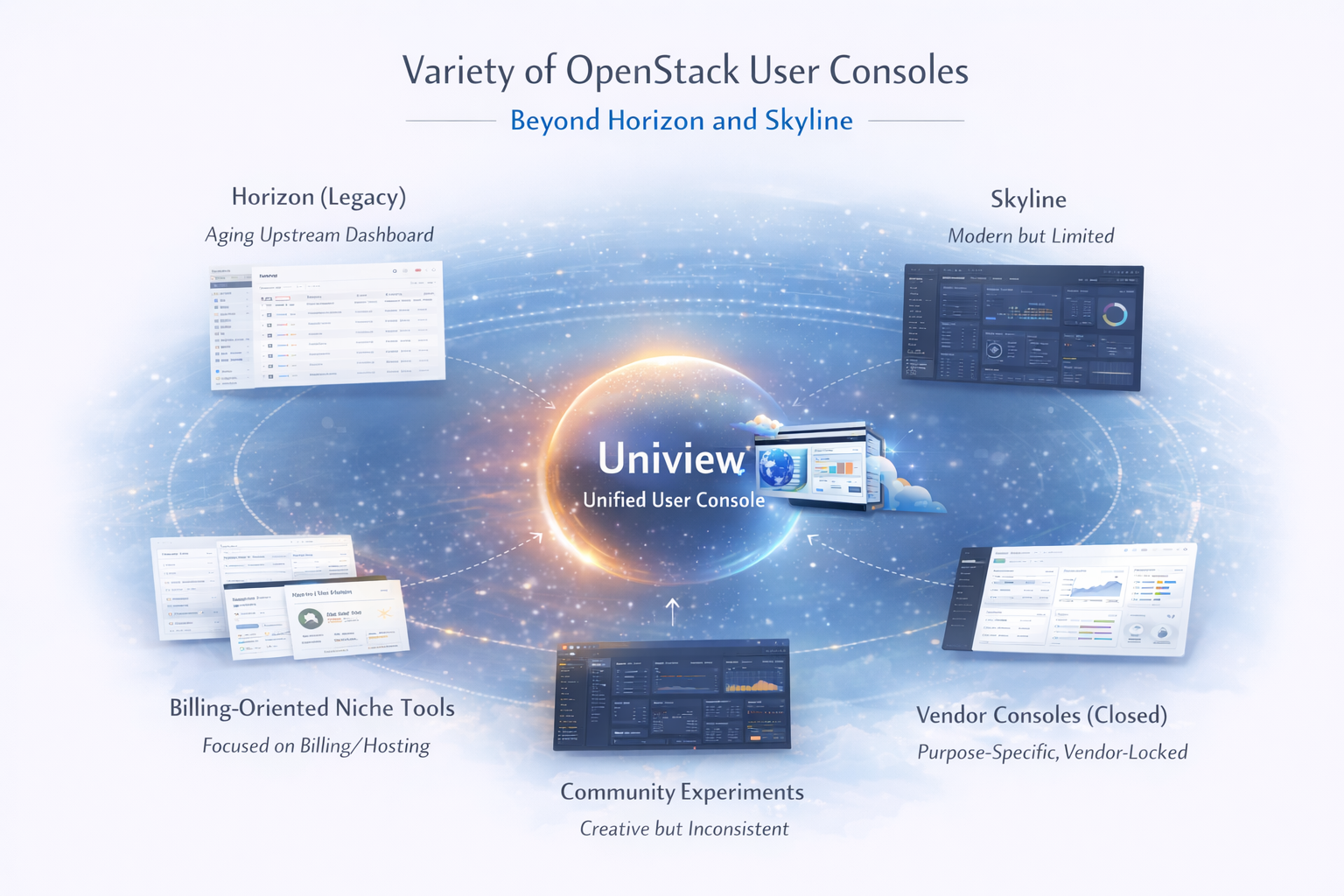
Horizon: The Legacy Upstream Dashboard
Horizon has been the default OpenStack dashboard for over a decade. It is stable, widely deployed, and covers most core services such as Nova, Neutron, Cinder, Keystone, and Glance.
Horizon has long been a mature and battle‑tested part of OpenStack, offering broad service coverage and the ability to extend functionality through plugins. But despite its reliability, it carries several limitations: the UI and UX feel outdated, performance slows noticeably under load, and its monolithic Django architecture makes modernization difficult. It also lacks many advanced workflows that modern operators expect, such as billing views, marketplaces, and multi‑region visibility. Horizon remains functional and dependable, yet it no longer aligns with the expectations of today’s cloud users or operators..
Skyline: The New Upstream Attempt
Skyline represents the community’s attempt to build a modern, API‑driven successor to Horizon. Its React‑based frontend and FastAPI backend give it a cleaner, faster foundation, and the experience is noticeably more responsive than the legacy dashboard. However, Skyline is still early in its lifecycle. Service coverage remains incomplete, many operational workflows are missing, and development velocity has slowed as upstream resources remain limited. While it points in the right direction, Skyline is not yet ready to serve as a full enterprise console for large or complex OpenStack environments.
Vendor-Specific User Consoles
Many commercial OpenStack providers have built their own purpose‑specific dashboards—often focused on VPS hosting, bare‑metal provisioning, backups, or other targeted workflows—but very few offer a truly comprehensive console. These vendor consoles tend to be polished and tightly integrated with specific areas such as billing, IAM, or operational tooling, yet they are neither open source nor portable across environments. Examples include OVHcloud Manager, the Rackspace Control Panel, Huawei’s FusionSphere Console, Mirantis MCP and Lens integrations, the Platform9 Console, and the CityCloud Portal. Each of these solutions is deeply tied to its vendor’s distribution, optimized for particular business models, and not designed to be swapped into a general‑purpose OpenStack deployment. They showcase what a modern, refined UX can look like, but they remain locked within proprietary ecosystems rather than serving the broader OpenStack community.
Non‑Standard Enhancements and Billing‑Oriented Panels
A number of smaller or highly specialized tools also exist, most of them focused on billing, hosting, or narrow operational use cases. Examples include CloudKitty’s rating and billing dashboards, Fleio’s hosting‑oriented control panel, various Virtuozzo and OnApp integrations, and a handful of community “CloudAdmin” experiments. These solutions serve their specific niches well, but they are not designed to provide a complete, unified OpenStack user experience. Instead, they address isolated needs rather than offering the broad operational visibility and workflow depth required for full cloud management.
What a Modern OpenStack User Console Should Deliver
While existing solutions offer useful features, they often leave gaps for enterprise and multi‑cloud operators to be perfect. Ideally, a next‑generation OpenStack console would offer:
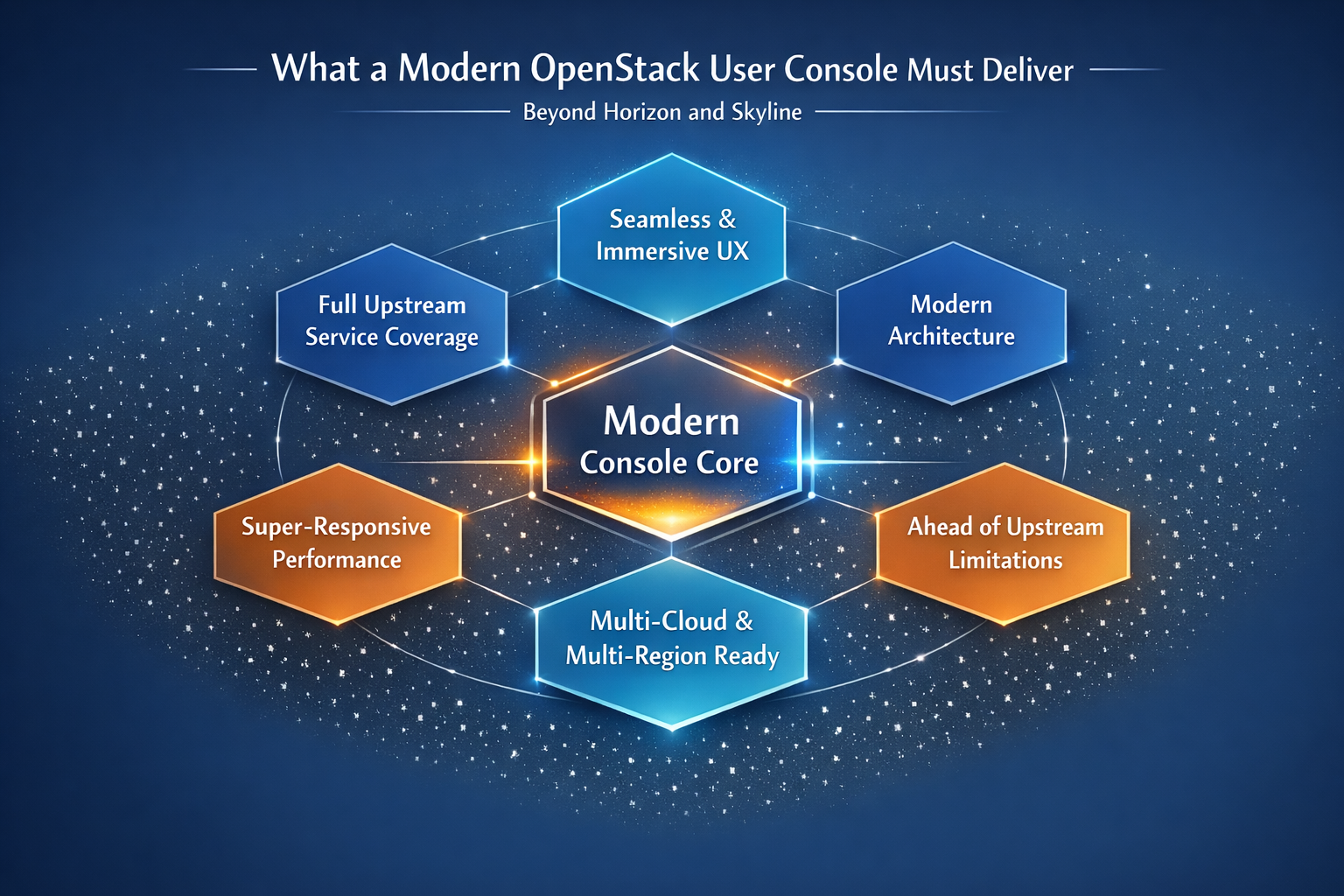
A console should feel cohesive, intuitive, and consistent across all services. Users should not feel like they are navigating a patchwork of plugins.
A modern console shouldn’t simply act as a thin wrapper around upstream APIs. It’s expected to go further—adding new capabilities where they make sense, completely rethinking workflows and user experience when the upstream model falls short, and optimizing slow or inefficient operations. A truly capable console provides aggregated views across services, exposes topology diagrams, surfaces cost and usage insights, and unifies operations across multiple clusters and regions. These are the layers of value that operators rely on every day, and they are precisely where most existing consoles struggle to keep up.
A modern console must support the entire OpenStack ecosystem: Compute, Network, Storage, Identity, Images, Containers, Orchestration, Billing and metering, Multi‑region and multi‑cloud. Partial coverage is no longer acceptable.
The console must be built on a modern, maintainable stack: Reactive UI, API‑driven backend, Real‑time updates, Efficient caching, High concurrency performance. This ensures long‑term sustainability and responsiveness.
Modern infrastructures rarely operate as one installation. It’s common to run multiple independent openstack within the same region or distribute them across several regions. Reasons of having multiple can be also business development that requires newer features that old clusters can't satisfy. This multi‑site footprint is essential for cross‑cluster backup targets, regional workload distribution, and high resiliency. A user console must account for these realities and provide a cohesive, unified experience across all deployments.
Operators expect dashboards to load instantly, even when querying thousands of resources across multiple regions. Performance is not optional — it is foundational.
Uniview: A Modern, Unified User Console for OpenStack
Uniview was designed from the ground up to close the gaps that exist across today’s OpenStack console ecosystem. It is not tied to any vendor distribution and works seamlessly with any OpenStack deployment. Its architecture is purpose‑built for scale, performance, and extensibility, combining redesigned or significantly enhanced service flows with an API‑first foundation. High‑performance data aggregation, multi‑cluster federation support, real‑time metrics and topology visualization, modular service integration, and cloud‑agnostic backend compatibility all come together to form a console that operates smoothly across diverse and complex OpenStack environments. This architectural approach enables Uniview to deliver a level of responsiveness, insight, and operational depth that traditional consoles were never designed to provide.
Uniview User Console Architecture and Features
Deeply Re‑Designed Workflows and Value‑Added Dashboards
Uniview goes far beyond simply exposing upstream APIs. Many core OpenStack workflows have been re‑designed or significantly enhanced to match the expectations set by hyperscaler cloud consoles. This includes dual OpenStack/Kubernetes dashboards, an elevated and fully modernized object‑storage experience, and comprehensive metric visibility across every major service. These additions transform the console from a basic UI into a powerful operational environment.
Matured over half a decade, proven through national adoption
Developing an OpenStack user console is never a short-term effort. Uniview has evolved over many years and thousands of iterations to reach the level of maturity it demonstrates today. Its reliability and scalability have been validated through national projects across Europe and North America, proving its readiness for enterprise and public-sector operations.
Wide Compatibility and Maintenance Easy
Uniview installs just as easily as Horizon — drop it onto a VM, configure it once, and it simply works. No special dependencies, no vendor‑specific hooks, no deployment friction. It integrates seamlessly with any OpenStack environment, regardless of distribution, release version, or backend architecture. By avoiding vendor lock‑in and embracing upstream standards, Uniview fits effortlessly into diverse clouds and mixed‑infrastructure environments. It also stays within the same technology family as the OpenStack controller — no exotic components, no disparate stacks — keeping TCO low with familiar technologies such as MySQL/MariaDB, straightforward load balancing, and reuse of the existing OpenStack identity provider.
Optimized Performance
Where upstream services are slow or inefficient, Uniview introduces optimized workflows, intelligent caching layers, and aggregated queries to maintain a fast, responsive experience—even at scale. Performance is treated as a foundational requirement, not an afterthought.
Multi‑Region, Multi‑Site, Multi-OpenStack
Uniview is built for complex, distributed cloud environments. It supports Keystone federation, shared‑nothing clusters, geographically separated regions, hybrid cloud topologies, and multi‑site deployments. All of these appear through a single, unified operational view.
For existing production clusters, Uniview makes it effortless to join the platform without worrying about architectural changes or instability. Long running clusters can be integrated exactly as they are, with no disruption, no prerequisites, and no transformation.
In contrast, other integration approaches — such as OIDC or SAML/OpenID or shared database — often require significant architectural restructuring. Changes on existing Controller OS, docker, version alignment on binaries, Databases, Users, projects, policies, and data mapping introduce heavy operational risk and can destabilize otherwise healthy clusters. Uniview avoids all of these pitfalls by integrating clusters natively and non‑intrusively.
Designed for Complex, Real‑World Operations
Uniview is not just a dashboard—it is an operational cockpit. It provides resource topology visualization, cost and usage insights, billing integration, project lifecycle management, and both operator and tenant workflows. High‑density resource visualization enables teams to understand large‑scale environments at a glance. This is the level of capability modern OpenStack operators require.
Conclusion: How Uniview Compares to Horizon, Skyline, and Vendor Consoles
A summary view to look at Uniview with those known solution groups
| Dimension | Uniview | Horizon (Legacy) | Skyline (Incomplete) | Vendor Consoles (Closed) | Billing‑Oriented Niche Tools | Community Experiments |
|---|---|---|---|---|---|---|
| Architecture | Modern, modular, cloud‑native; API‑driven integration layer | Monolithic Django app; dated stack | Partial modularity; evolving React front‑end | Proprietary frameworks; vendor‑locked | Lightweight, single‑purpose microtools | Experimental, inconsistent architectures |
| UX & Design | Seamless, immersive, editorial clarity; enterprise‑grade UI/UX | Functional but dated; low visual hierarchy | Modern but incomplete; lacks polish | Polished but brand‑biased; inconsistent with upstream | Utility‑driven; minimal UX investment | Creative but non‑standard UX patterns |
| Upstream Coverage | Full upstream service coverage with extensible plugin model | Broad but static coverage; slow updates | Partial coverage; missing advanced services | Selective coverage; vendor‑specific APIs | Limited to billing or quota endpoints | Varies by experiment; often incomplete |
| Performance | Super‑responsive, async‑optimized, scalable | Slow under load; synchronous rendering | Improving; limited optimization | Fast but opaque; closed telemetry | Adequate for small datasets | Unpredictable; prototype‑level |
| Extensibility | Plugin‑based; open integration with upstream and custom modules | Rigid; extensions require deep code changes | Emerging plugin model; limited documentation | Closed; vendor‑controlled extensions | Minimal; focused on billing logic | Flexible but unstable; experimental APIs |
| Governance & Community Alignment | Aligned with upstream; transparent roadmap | Upstream legacy; slow governance | Upstream‑driven but under‑resourced | Vendor‑centric; limited community input | Independent; niche community | Grassroots; fragmented collaboration |
To conclude, the OpenStack ecosystem delivers powerful infrastructure capabilities, but the user console still requires per business last‑mile engineering to meet real operational needs. Horizon is aging, Skyline remains incomplete, vendor‑specific consoles are narrow and closed, and community tools tend to focus on niche use cases. Modern clouds demand a modern console—one that is fast, unified, comprehensive, and capable of operating seamlessly across multiple clusters and regions. Uniview fills this gap, providing a next‑generation user console that works with any OpenStack deployment and is built for enterprise‑grade operations at scale.
Authored by Jack Dang · At Toronto Apr 2026