
Enterprise access control is the cornerstone of successful Kubernetes adoption. Out of the box, Kubernetes is a container orchestrator—it was never designed as an enterprise-ready, multi-tenant control plane. As organizations scale to dozens or hundreds of engineers managing fleets of clusters, enforcing zero-trust access becomes a top operational priority.
Defining who can access what, when to onboard them, how to revoke access immediately, and from where they connect can make or break daily operations. Real-world enterprise roles span executive read-only observers, cluster administrators, regional DevOps teams, and developers who only need read/write access to staging or development namespaces.
Smaller teams often rely on Service Accounts (SAs), static kubeconfig files, bastions, or jumpboxes. However, this flat approach is neither safe nor traceable. If a critical production asset is deleted, administrators struggle to trace the exact person responsible. Even worse, when a team member leaves the company, cleanly terminating their access across every cluster becomes nearly impossible. Common pain points quickly pile up:
- Blind Audit Trails During Incidents: When shared credentials are used, every action looks identical in the Kubernetes audit log—making it impossible to trace who modified or deleted a production resource during an outage or security investigation.
- Unrevocable Credential Sprawl: Static
kubeconfigfiles and long-lived Service Account tokens routinely end up copied onto developer laptops, Slack threads, and CI secrets, completely bypassing your corporate Identity Provider (IdP) and MFA policies. - Lingering Offboarding Exposure: When an engineer or contractor leaves the company, revoking their access across 30+ clusters manually takes days—leaving active, privileged backdoors open long after their HR account is deactivated.
- Compliance & Velocity Bottlenecks: Security teams fail SOC 2, ISO 27001, or HIPAA audits over unmonitored cluster access, while developers wait days for manual RBAC tickets just to debug a staging pod.
Modern platforms like Uniview Kube Hub and Teleport both solve enterprise Kubernetes access control, yet they differ significantly in architecture, user experience, maintenance overhead, and total cost of ownership. Below is a section-by-section, side-by-side comparison to help your team make the right architectural decision, followed by a practical walkthrough of multi-cluster onboarding and one-step offboarding in Uniview Kube Hub.
Side-by-Side Executive Summary
Both Teleport and Uniview Kube Hub deliver high-security, zero-trust access control for enterprise Kubernetes environments. However, because of their underlying architectural differences, they offer sharply contrasting end-user experiences. Overall, Uniview Kube Hub provides a far more frictionless workflow with zero client overhead or learning curve compared to Teleport. Below is a high-level executive summary of how the two platforms stack up:
| Evaluation Criteria | Uniview Kube Hub | Teleport |
|---|---|---|
| Core Focus | Kubernetes-native multi-tenancy, Zero-Trust Access Control, self-service dashboards, and GPU/Serverless workloads | Unified zero-trust Privileged Access Management (PAM) across K8s, SSH, and databases |
| Cluster Integration | Agentless (external API proxy + scoped Service Account secret) | Agent-based (requires deploying teleport-kube-agent pods via Helm in every cluster) |
| Authentication Engine | Native Kubernetes Impersonation & Group headers | Native Kubernetes Impersonation & Group headers |
| IdP Support | Unified OIDC (Entra ID, Okta, Google Identity, Keycloak) | Unified OIDC / SAML (Entra ID, Okta, Google Identity, Keycloak) |
| Developer CLI Workflow | Standard kubectl, Helm, Headlamp, or Lens (zero extra binaries) |
Requires proprietary tsh CLI wrapper on every workstation |
| Upgrade & Fleet Scaling | Zero in-cluster upgrades; supports one-click Cluster API (CAPI) onboarding | Must upgrade in-cluster agents across all clusters alongside control plane updates |
| User Experience | Generic, native Kubernetes experience; fluent workflow with zero extra client overhead for both adhoc kubectl cli or machine workloads | Common friction reported around mandatory tsh CLI adoption, frequent session re-authentication, and a steeper learning curve for non-admin users |
Apples-to-Apples Comparison
1. Authentication Mechanism
Both platforms build directly on mature, out-of-the-box Kubernetes primitives without modifying the upstream Kubernetes API server.
| Attribute | Uniview Kube Hub | Teleport |
|---|---|---|
| Authorization Primitive | Kubernetes Impersonation (Impersonate-User / Impersonate-Group) |
Kubernetes Impersonation (Impersonate-User / Impersonate-Group) |
| Credential Model | Centralized token lifecycle management via external control plane | Built-in Certificate Authority issuing short-lived X.509 certificates |
| Cluster API Impact | Zero changes to native Kubernetes RBAC definitions | Zero changes to native Kubernetes RBAC definitions |
| Machine Identity | Machine Revocable Credential (scoped, centrally revocable kubeconfig tokens for CI/CD and automation) |
Machine & Workload Identity (Teleport Machine ID issuing short-lived, auto-renewing X.509 certificates for bots and services) |
2. Architecture Comparison
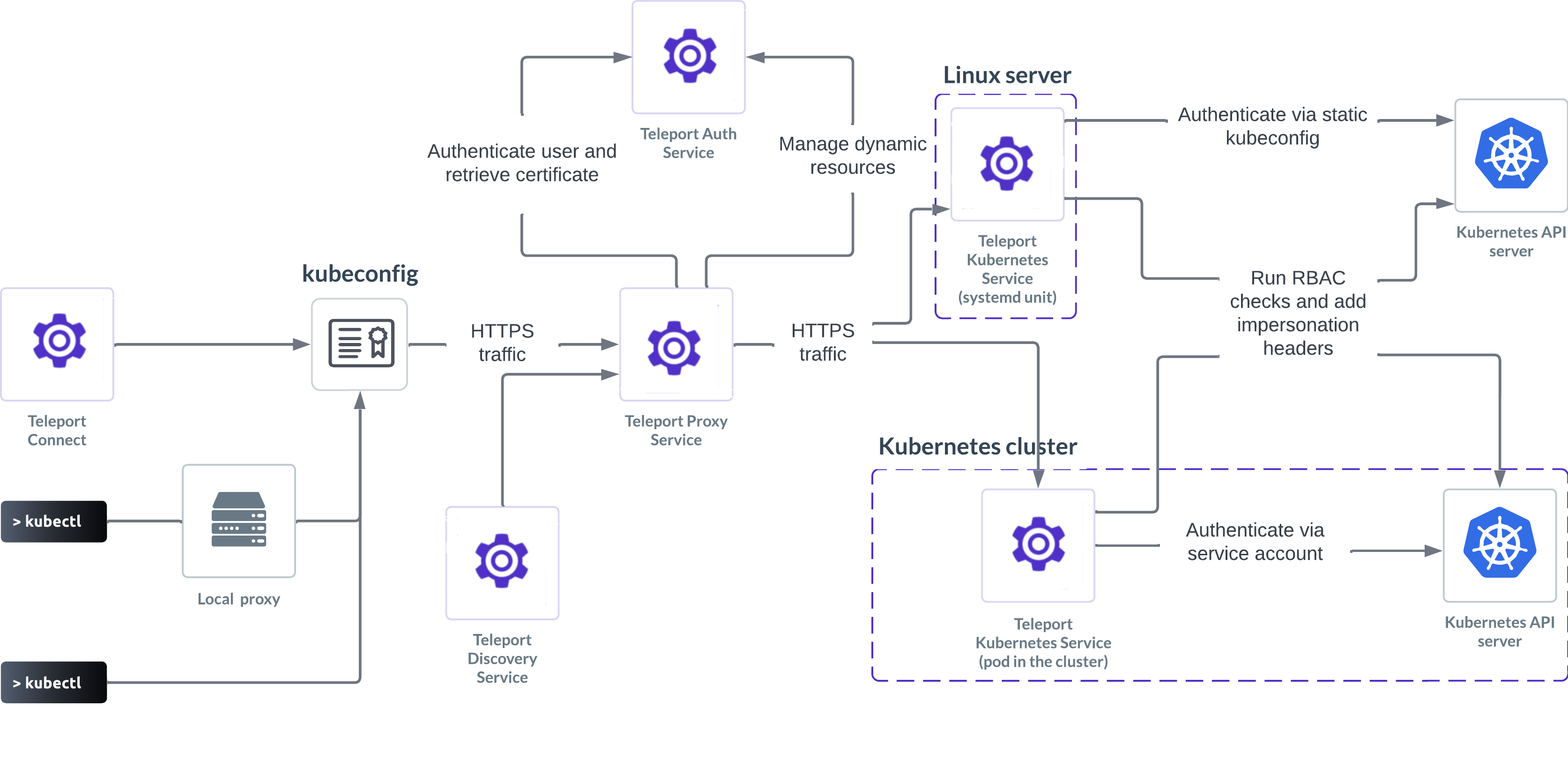
Teleport Architecture:
Uniview Architecture:
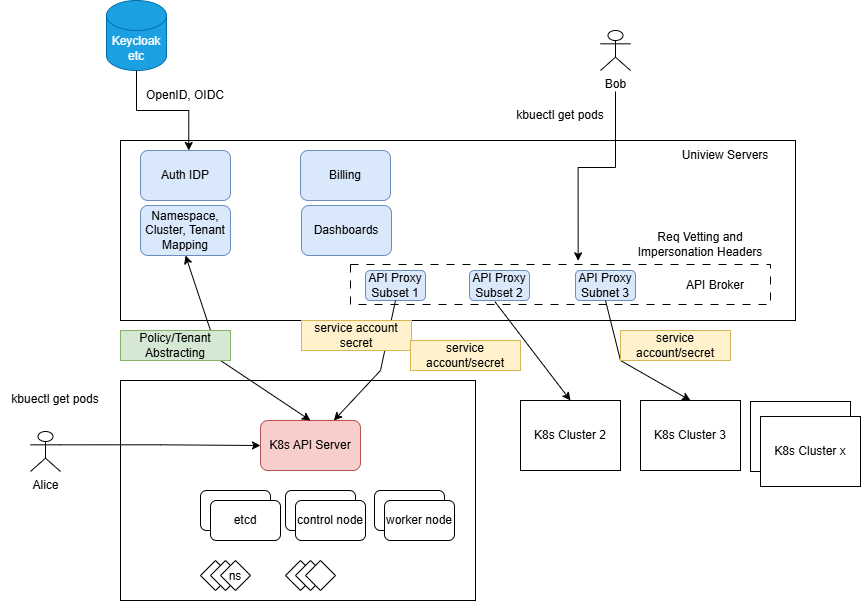
While both systems achieve similar control plane outcomes, Teleport couples an agent pod inside every cluster, whereas Uniview Kube Hub decouples integration completely outside the target cluster.
| Architectural Layer | Uniview Kube Hub Component | Teleport Equivalent |
|---|---|---|
| Cluster Bridge | External API Proxy Subset (outside cluster) | Teleport Kubernetes Service (Pod inside every cluster) |
| Cluster Credential | Scoped Service Account Secrets | In-cluster Service Account + Join Token |
| Core Runtime | Uniview Core Docker Service | Teleport Systemd Unit / Control Plane Service |
| Identity & Policy Engine | Uniview Auth IdP + Namespace/Cluster Mapping Engine | Teleport Auth Service |
| User Gateway | Uniview Web Dashboards + API Subset | Teleport Proxy Service |
3. IdP Integration
Both solutions eliminate per-cluster identity configuration by connecting once to your corporate directory.
| Feature | Uniview Kube Hub | Teleport |
|---|---|---|
| Integration Scope | Single IdP connection governs all onboarded clusters | Single IdP connection governs all onboarded clusters |
| Supported Protocols | OIDC (OpenID Connect) | OIDC (OpenID Connect) & SAML |
| Supported Providers | Microsoft Entra ID, Okta, Google Identity, Keycloak, etc. | Microsoft Entra ID, Okta, Google Identity, Keycloak, etc. |
4. Integration Process with Target Clusters
Onboarding a new Kubernetes cluster highlights the operational difference between an agentless proxy and an agent-based architecture.
| Step | Uniview Kube Hub (Agentless) | Teleport (Agent-Based) |
|---|---|---|
| Step 1 | Create a scoped Service Account on the target cluster. | Generate a dynamic or static join token on the Teleport Auth server. |
| Step 2 | Paste the cluster endpoint and SA secret into Uniview (or import via CAPI). | Configure Helm values with proxy address, join token, and cluster labels. |
| Step 3 | Complete. Cluster is immediately ready for tenant mapping. | Deploy and maintain the teleport-kube-agent Helm chart inside the cluster. |
5. User Onboarding
While both platforms support automated SSO group sync, local user provisioning differs between a visual web-first workflow and a CLI-driven registration flow.
| Onboarding Stage | Uniview Kube Hub (Web Console / CLI) | Teleport (CLI-Driven) |
|---|---|---|
| 1. Account Creation | Admin signs into the web console and creates the user (or enables self-service online registration). | Admin runs tctl users add <user> --roles=<role> on the Teleport auth node. |
| 2. Access Assignment | Admin assigns the user to a Project (Tenant) mapped to target clusters/namespaces. | Teleport generates a temporary, auto-expiring registration link valid for 1 hour. |
| 3. Activation | User logs into the console and immediately accesses all clusters in their Project. | Admin shares the link; user opens a browser to set a password and configure MFA before 1 hour expires. |
6. Adhoc Kubectl CLI Access Process Comparison
Daily kubectl usage contrasts standard Kubernetes tooling against a proprietary client wrapper. Overall, Uniview Kube Hub provides a centralized, intuitive user console with one-click generation for either short-lived ad-hoc kubeconfig files or long-lived, revocable machine tokens with customizable expiration dates. In contrast, Teleport requires installing the tsh binary on every workstation and running through a more verbose CLI workflow to achieve the same result.
| Workflow Step | Uniview Kube Hub | Teleport |
|---|---|---|
| Step 1: Setup | No client installation required; uses standard kubectl. |
Install and configure the proprietary tsh binary on every workstation. |
| Step 2: Authenticate | Sign in to the Uniview web dashboard (with MFA if enabled). | Run tsh login --proxy=<url> in the terminal. |
| Step 3: Select Cluster | Navigate to the target cluster and download an ad-hoc or scoped kubeconfig. |
Run tsh kube ls and tsh kube login <cluster> to update local context. |
| Step 4: Execute | Run standard kubectl, Headlamp, or Lens directly. |
Run kubectl commands proxied through the tsh session. |
7. Revocable Token for Kube API Access for Machine Workloads
Automating CI/CD pipelines and external scripts contrasts a lightweight, revocable kubeconfig token against running a background identity daemon on every runner.
| Workflow Step | Uniview Kube Hub | Teleport (Machine ID) |
|---|---|---|
| Step 1: Setup | No client or daemon installation required; uses a standard kubeconfig. |
Create a dedicated Bot user/role on the Auth server and install the tbot agent binary on every CI/CD runner or host. |
| Step 2: Authenticate | Admin or developer signs in to the Uniview web dashboard (with MFA if enabled). | Configure tbot with a join token or cloud workload identity (e.g., GitHub OIDC) to authenticate to the proxy. |
| Step 3: Generate Credential | Navigate to the target cluster, select Revocable Credential, define its expiration time, and generate the token. | Run tbot as a background daemon to continuously fetch and renew short-lived X.509 certificates and kubeconfig files. |
| Step 4: Apply to CI/CD | Inject the generated kubeconfig secret into your CI/CD pipeline and run standard kubectl or Helm commands directly. |
Point CI/CD jobs to the tbot-managed output directory to execute kubectl through the Teleport proxy. |
| Step 5: Revoke | Sign in to the Uniview Console, browse existing credentials, and click Revoke to invalidate the token immediately. | Run tctl bots rm <bot-name> (or delete the bot role) on the Auth server and wait for active short-lived certificates to expire. |
8. End User Experience
Overall, Teleport requires the tsh binary for token generation and authentication—a proprietary workflow that every user must master to work effectively. In contrast, Uniview Kube Hub preserves a standard, CNCF-compliant Kubernetes workflow for end users by encapsulating proxy complexity behind the scenes without exposing extra steps or unfamiliar tooling.
| Dimension | Uniview Kube Hub | Teleport |
|---|---|---|
| Client Tooling | 100% generic Kubernetes UX; works natively with kubectl, Helm, Headlamp, and Lens. |
Proprietary tsh CLI workflow required alongside standard tools. |
| Visual Interface | Rich, persona-tailored web dashboards for admins, tenants, and developers. | Web UI focused primarily on resource inventory, audit logs, and session playback. |
| Learning Curve | Minimal—engineers use the exact Kubernetes workflows they already know. | Moderate—requires training all developers and QA staff on tsh commands and certificate expiry. |
9. Reliability & High Availability
Architecturally, Uniview Kube Hub places its proxy outside the target clusters using a shared, stateless setup across the entire fleet. This sessionless design makes the control plane inherently reliable and easy to scale. In contrast, Teleport relies on an in-cluster agent pod inside every cluster, which often becomes a vulnerable single point of failure and operational friction.
| Reliability Factor | Uniview Kube Hub | Teleport |
|---|---|---|
| In-Cluster Failure Risk | Zero. No agent pods run inside target workload clusters. | Single Bridge Dependency. If teleport-kube-agent crashes or OOMs, cluster access breaks. |
| High Availability Model | Stateless API proxy subset replicates horizontally across Uniview instances. | Requires running multi-replica agent deployments inside every managed cluster. |
10. Security & Compliance
Both Uniview Kube Hub and Teleport share the core mission of meeting strict enterprise security requirements through zero-trust access controls, SOC 2 compliance, and centralized auditability.
| Security Capability | Uniview Kube Hub | Teleport |
|---|---|---|
| Framework Compliance | SOC 2 & GDPR aligned with zero-trust access controls | SOC 2, FedRAMP, HIPAA, and PCI DSS aligned |
| Credential Hygiene | Eliminates static cluster-wide kubeconfig sprawl via centralized token lifecycle |
Eliminates static credentials via short-lived X.509 certificates |
| Advanced PAM Controls | Strict tenant/namespace isolation and centralized audit trails | Just-in-Time (JIT) Slack approvals, per-session MFA, and kubectl exec video replay |
11. Scalability & Fleet Operations
| Scaling Dimension | Uniview Kube Hub | Teleport |
|---|---|---|
| Cluster Provisioning | Built-in Cluster API (CAPI) console for one-click cluster creation and onboarding. | Connects to existing clusters; requires external tooling for cluster provisioning. |
| Fleet Onboarding | Install-free integration via static SA secret scales to hundreds of clusters in minutes. | Requires automated GitOps/Helm pipelines to deploy agents and manage join tokens per cluster. |
| Day-2 Upgrades | Upgrade the central Uniview Hub once; zero agent upgrades needed on target clusters. | Must continuously upgrade teleport-kube-agent across every cluster to match control plane versions. |
Walkthrough: Multi-Cluster Onboarding and One-Step Offboarding in Uniview Kube Hub
To see how an agentless, tenant-centric model works in practice, consider a new engineer joining a platform team responsible for 15 staging and production clusters:
- Define the Project (One-Time Setup): The platform administrator groups the 15 clusters (or specific namespaces within them) into a single Uniview Project (Tenant) with mapped RBAC roles—such as
namespace-writeron staging andnamespace-readeron production. - Instant Multi-Cluster Onboarding: When the engineer joins, the administrator adds their account (or syncs their OIDC group) to that Project. The engineer signs into the Uniview console, immediately sees all 15 authorized clusters, and downloads a scoped
kubeconfig—without anyone touching a single cluster API server. - One-Step Global Offboarding: When the engineer leaves the company or switches roles, the administrator removes them from the Uniview Project (or deactivates them in the corporate IdP). Access across all 15 clusters is cut off instantaneously, leaving zero orphaned Service Accounts or lingering credentials behind.
Which One Fits Your Needs?
Both platforms eliminate static kubeconfig risks and bring zero-trust governance to Kubernetes, yet they serve different operational priorities:
| Choose Uniview Kube Hub If... | Choose Teleport If... |
|---|---|
| You want a generic, native Kubernetes experience without forcing developers to install proprietary CLI binaries. | Your primary driver is strict regulatory compliance (FedRAMP, HIPAA, PCI DSS) across mixed infrastructure. |
| You want low-maintenance, frictionless, agentless integration without deploying or upgrading pods inside every cluster. | You have dedicated platform ops capacity to manage and upgrade in-cluster agent pods and join tokens across your fleet. |
| You need granular multi-tenancy, namespace-level isolation, and self-service web dashboards for diverse user personas. | You require Just-in-Time (JIT) privilege elevation and interactive video replay of kubectl exec sessions. |
| Your workloads are heavily Kubernetes and GPU/AI-oriented, and you want install-free, low-maintenance fleet scaling. | You want a single Privileged Access Management (PAM) proxy covering legacy SSH servers and databases alongside Kubernetes. |